shinyblog

Tuesday, January 23, 2007

practice makes perfect

To be productive as a software developer, or tester, or sys-admin, you have to know how to use your tools. Most development tools in the projects I run with are based on the old-skool unix model: a shell script, a build utility, obscure text configuration files, environment variables, and a source-code control system. Systems like that are exquisitely sensitive to errors, and even "vanilla" installs usually need some local tweaking, and some setup rituals. All of this can be maddening when you want to get some work done and the tools won't let you. What can be done?
Certainly, build tools should be easier to use. But they're not, and that's the world we live in. The answer came to me last night watching a martial artist do forms on tv. In martial arts, forms are a detailed choreography that represent a hypothetical fight; the purpose of practicing forms is to get each detail of each action dialed-in. I recognized the form being performed; it was the first form I learned, as a beginner in Ja Shin Do. "He must be a beginner," I thought, "to still be practicing the basics." Then I kicked myself: he was practicing the basics to perfect them. Go back to the beginning, and do it again... this is the practice of experts.
We get good at using the tools by using them, over and over. Start from a blank slate and build a development environment from nothing. Do this ten times in a row, and pay attention to exactly where you install the prerequisites. Build muscle memory for what goes where. Do it ten more times, and pay attention to the initial invocation rituals. Do it again, over rocky ground this time, or an os you don't like. If you want to be an expert software tools user, then practice, practice, practice.

Monday, January 22, 2007

dynamically-typed interpreted languages

On type mismatches in dynamically-typed interpreted languages: Javascript gives you enough rope to shoot yourself in the foot.

Monday, January 15, 2007

love letter to health insurance

A few weeks ago, I had an encounter with a serrated knife and a loaf of pecan-raisin bread that resulted in five stitches in my thumb. I went to a nearby small emergency room, and was in and out in two hours. The doctor and the staff were all friendly and competent; the care was excellent, and my thumb healed well. I just got the explanation-of-benefits from my health insurance company; the bill total was $2587.85, of which I am responsible for $62.37.
This is, arguably, what the US health care system is best at; definitive care for an acute condition, with no follow-up and no prevention. I'll take it! Now if we could just expand that quality of care to chronic conditions and prevention, and provide it to everyone regardless of financial means or immigration status... that would be something. I wonder how Arnold's latest proposal for mandatory health insurance would cover my self-employed neighbor cutting her thumb at work, or an illegal immigrant cutting his thumb cooking breakfast for his family. Thank you, Aetna and Seton Medical Center, for taking care of me. Please take care of everyone else, too.

Saturday, January 06, 2007

handle with care

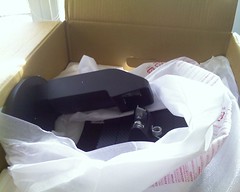
This is what happens when LCD monitors are not packed well and not handled gently while shipping.
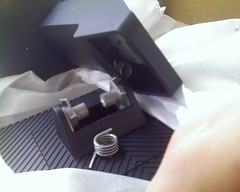
010607_10531.jpg    010607_10541.jpg
When I went to remove the monitor from the box, the back and base of the monitor were already totally separated from the shiny part of the monitor. This close-up shows the metal pivot arms inside the mega-adjustable stand, apparently ripped in two by a vengeful god.
I also spent 40 minutes on hold with Fry's trying to get permission to bring my bad memory down to the store and do a store credit right then and there. But what I really want is a monitor, not memory.
Well, no, what I really want is time and energy and management buy-in on mavenizing the Open Laszlo build. The monitors and memory and chairs and for that matter eggs and cheese and toast and steaks are all means to an end... and the end to be desired is a rich, complete, solid Open Laszlo framework, adopted by thousands for their RIA needs.

Thursday, January 04, 2007

hardware designers, meet industrial designers

When it comes to picking memory to upgrade machines, my knowledge of computer architecture has not kept up with the state of the art. I decided that my shuttle PC (which I've been building and configuring for a month now) really needed 2 gb of ram, so I picked out a highly buzzworded dual 1gb kit on Fry's, and waited eagerly for it to appear. It arrived and looked right, so I popped open the pc's case, popped out the paltry 512 mb ram in there now, and popped in the new ram... except it didn't fit. I checked over and over that the notch was in the right place, but the dimm just wouldn't go into the socket. At a loss, I compared the new dimm to the old dimm. Looks the same... but wait, the notch is about 2 mm offset on the new dimm from the old one. That's why it almost but not quite fits.
A flight of google research revealed that I had bought DDR2 ram, but my motherboard had sockets for DDR ram. DDR memory and DDR2 memory are the same size and shape, cost about the same amount of money, and look pretty much the same... but one has 220 pins and one has 184 pins and the notch is in a slightly different place... by a few millimeters.
Hardware designers? Hello, meet industrial designers. Things that are different should look different. If two parts don't fit together, they shouldn't almost fit together. Make failures obvious. If the notch was offset by a centimer and not a millimeter, the difference would have been clear. If DDR2 was a centimeter longer or shorter, the difference would have been clear... and I should remember not to attempt to upgrade my own hardware.

national change your passwords day: 1passwd, almost

Just 11 days until National Change Your Passwords Day, January 15, 2007! Are you ready?
I've been using 1passwd, a tasty mac password generator, password storage, and form autofill application, with plugins for Firefox and Safari. It is a win, and I now endorse it as a great tool to use on National Change Your Passwords Day. If you always use one computer, 1passwd automates the whole password management workflow; on a web form it will generate a new secure password for you and store that password in its keychain. Then you can look up the password in the 1passwd application, or invoke the 1passwd web plug-in to fill in forms on a particular web page. Sweet. Combine this with the Schneier method of writing your passwords on a small piece of paper that you treat as precious, and you've got a complete story.
One problem I encountered: writing down long passwords is error-prone. 1passwd doesn't seem to have built-in sync'ing between different computers. The combination of these two factors meant that yesterday I was at work, twenty miles from my home machine's keychain, and I couldn't log in to my banking webapp, because my hand-written password crib sheet wasn't clear enough on lower-case vs upper-case, '1' vs 'l', etc. I had to take care of banking business before the end of the banking day, and leaving work to drive home to get my password wasn't an option. I drove to a bank branch and took care of my business there... but most online relationships don't come with a bricks-and-mortar storefront in every shopping plaza. The moral is, change your passwords, but figure out how to write them down legibly, and make sure that your written record is correct.
1passwd is $39.95, and so far it's totally worth it. The best part: it imports all of your accounts and passwords from Firefox and Safari.

wake up, sleepy computer

When waking a computer from sleep or the screensaver, get in the habit of using an arrow key, shift key, or moving the mouse. Other tempting wake-up signals, such as hitting any key or clicking the mouse, risk triggering an unwanted, potentially dangerous operation if the computer is not quite asleep. The display might be blank because the monitor is unplugged, because the monitor has a built-in energy saver, or because a laptop booted up thinking that an external monitor was connected. In any of those cases, you might have a live computer listening to a live keyboard or mouse; when you intend to say "wake up, computer," you might actually be one-click purchasing a 30" Apple Cinema Display on amazon.com. (If you tend to browse amazon for such things, that is.)
It's farfetched, I know, but this is another "if it happens just once, you're screwed" events, easily avoided by routinely waking up a sleepy computer by (my personal favorite) hitting up-arrow.